The 2026 Legal Docketing Market Map
A practitioner-informed look at who actually maintains the rules your firm depends on, where deadline errors originate, and what is quietly shifting in how docketing teams work.
 CalendarRules
Originally an independent aggregation of court rules, acquired by Clio in 2021. Powers a significant portion of the market via API.
 Independent Platform
Deeply integrated with Microsoft 365 and Outlook. Serves as the rules engine for many third-party case management platforms.
 Enterprise Engine
Widely used engine for large defense firms.

Modern rules authority providing citation and hierarchy of rules.
Thomson Reuters
Proprietary EcosystemProprietary engine used exclusively within the TR ecosystem.
JuraLaw
Legacy / HybridHybrid: Proprietary IL/NY rules + licenses CalendarRules for national.
About this piece
This post was prepared for a docketing practitioner roundtable and draws on discussions with docketing professionals, publicly available vendor materials, and practitioner forums. It is intended as a reference brief, not legal advice.
Court Rules Are a Supply Chain
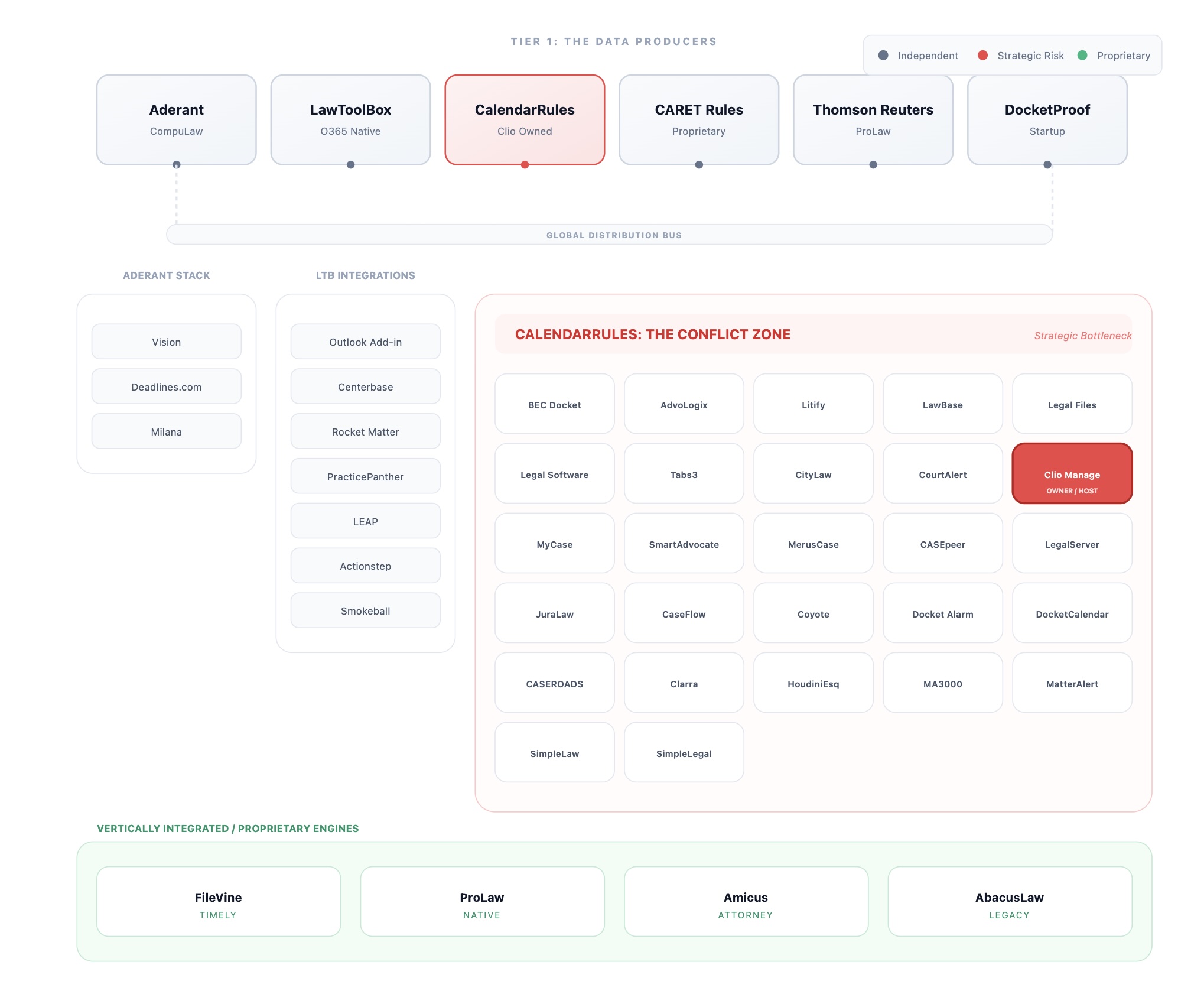
Most docketing software doesn't maintain its own rules. It licenses them. A small number of producers maintain the actual rulesets; a much larger number of practice management tools, case management platforms, and deadline calculators license that content from them.
That has a direct operational implication: when the rules producer changes its product, pricing, or ownership, your workflow changes too, even if your interface looks identical.
The three dominant producers in the market today are Aderant (CompuLaw/Milana), CalendarRules (acquired by Clio in 2021), and LawToolBox. A handful of others maintain independent or hybrid engines: Thomson Reuters (ProLaw ecosystem), JuraLaw, and Filevine (its own proprietary ruleset).
Rule Sources: Who Powers What
The table below maps common tools to the rules engines behind them. It is useful context when comparing outputs, evaluating integrations, or planning a migration.
| Tool | Rules Source | Notes |
|---|---|---|
| BEC Docket Enterprise | CalendarRules (Clio) | CalendarRules-backed deadline calculations. Day-to-day differences tend to come from workflow choices and how reminders and exceptions are governed. |
| SmartAdvocate | CalendarRules (Clio) | Support boundaries can be split between the application vendor and the rules provider, especially during outages or rule-change disputes. |
| DocketCalendar | CalendarRules (Clio) | Marketed as "Powered by CalendarRules." Update cadence and change notifications can matter more than the UI for integration-heavy workflows. |
| MerusCase, Litify, Tabs3/PracticeMaster | CalendarRules (Clio) | Some platforms embed CalendarRules under the hood. When something feels off, the root cause is often on the boundary between the app and the rules engine. |
| Clio Manage | CalendarRules (Clio)-owned | Clio owns CalendarRules, and CalendarRules powers Clio's Court Rules feature. Practical considerations tend to be pricing and exit-path details. |
| LawToolBox Microsoft 365 / Outlook | LawToolBox (own) | Self-contained rules. The lived experience is often driven by Outlook sync behavior and reminder governance as much as the rules engine. |
| LEAP, Actionstep, Smokeball, PracticePanther, Rocket Matter, Centerbase, Neos, iManage, NetDocuments, and others | LawToolBox (integration) | Rules come from LawToolBox via integration. Update propagation and support ownership depend on the specific integration. |
| CompuLaw / Milana | Aderant (own) | Aderant-managed rules library. Differentiators tend to be configuration, training, and workflow fit. |
| Deadlines.com, eDockets (ALN), Elite | Aderant | Broader Aderant ecosystem. Elite (Thomson Reuters financial/practice management) typically integrates CompuLaw for docketing. eDockets was acquired by Aderant. |
| ProLaw / Deadline Assistant | Thomson Reuters (own) | Proprietary rules engine used exclusively within the Thomson Reuters ecosystem. |
| JuraLaw | Hybrid (own + CalendarRules) | Develops proprietary rules for major jurisdictions (IL, NY) and uses CalendarRules for national coverage. Formerly Law Bulletin Media. |
| Filevine | Timeline / Timely (own) | Filevine maintains its own proprietary ruleset using a mix of AI extraction and human verification. Some deployments also use third-party tools via integrations. |
Control check
- Which rules engine is producing your dates, and what is the escalation path when outputs are disputed?
- Where are overrides recorded (scheduling orders, standing orders, local rules), and how are they linked back to the matter?
- Who can publish dates to the team calendar, and what verification step sits immediately before publish?
How Firms Actually Run Docketing
There is no single standard workflow. From practitioner discussions, five distinct operating models appear regularly across firms of all sizes.
| Model | What It Looks Like | The Trade-off |
|---|---|---|
| Calculator + manual entry | Run dates in an online calculator. Pull up the rule PDF. Verify the math. Type the date into the case management system. Set reminders by hand. Roughly 15–30 minutes per complex trigger. | Slow, double entry. But it preserves a verification gate: a human checks the controlling rule text before dates are published. This is the workflow most disrupted by integrated push migrations. |
| Shadow docket | Parallel Excel spreadsheet or wall calendar alongside the software. Common in SMB and mid-market. | Version drift risk ("which one is authoritative?"). But it catches errors that single-source verification misses. |
| Two-person audit | Two people independently process the same correspondence, then compare reports for discrepancies. Weekly audit reports become the documentation trail. | Expensive in staffing. But it is the defensible standard. The audit trail typically lives in email, which is fragile for malpractice discovery. |
| Excel cascade formulas | Complaint filing date is the trigger column. Every downstream deadline auto-calculates. Usually on SharePoint for live collaboration. | Full transparency: every cell and formula is visible. Zero cost. But you own maintenance and have no upstream rules feed. |
| Physical systems | Wall calendars, cork boards, binders with color-coded pen entries. | Often a fallback when software is down or not trusted. No version control. No audit trail beyond the physical object. |
Where the Errors Actually Are
The common failures are rarely "the calculator did math wrong." They are input errors and governance gaps: who entered what, which rule controlled, and whether the verification gate happened before the date was published.
Wrong inputs, correct math
Software can calculate perfectly from the wrong service method, wrong party type, or wrong trigger. The output looks plausible, so it goes live. Nobody catches it until something goes wrong downstream.
Court-day vs. calendar-day order of operations
California CCP § 1005 is a good example of how this breaks: 16 court days notice for motions, plus additional calendar days depending on service method and mailing location (e.g., +5 for in-state mail). If the sequence is applied incorrectly, you can be off by 2–3 days. A black-box tool hides whether it applied the sequence correctly.
Scheduling orders vs. rule defaults
Scheduling orders typically supersede default rule timelines. Most tools still show the rule default unless someone manually overrides. The scheduling order in iManage usually does not talk to the docketing system.
Premature publish
Dates get pushed to case team calendars with default reminders before anyone has verified them. This control point can disappear when teams migrate from calculator workflows to push-based integrations. The integration is faster but the gate is gone.
Standing order staleness
Judges update PDFs without an obvious notification channel. A common failure mode: a filing is rejected due to a requirement buried in a standing order that changed since anyone last checked.
What's Actually Changing
Calculator workflows are shifting toward integrations
If your firm uses an online calculator as a second set of eyes (run dates, verify against the rule PDF, then enter into your docketing system), watch this closely. The market is moving toward integrated plugins that push dates directly.
Integrated plugins are faster, but they can eliminate the verification gate: the moment a human checks the controlling rule text before dates reach the case team. Custom reminder patterns can also get standardized or overridden unless explicitly configured.
The stakes here are significant because CalendarRules is not just a standalone calculator. Its engine powers deadline calculations for 20+ partner products, across 1,600+ subscriber firms, calculating 750,000+ deadlines per month. Any shift in how CalendarRules distributes its product, or changes ownership or pricing, has downstream effects across that entire partner ecosystem.
Auditability expectations are rising
More clients and risk teams want to see how a date was calculated: the rule citation and the controlling authority, including overrides like standing orders and scheduling orders. Most tools show a date. Fewer show the reasoning.
Rule Updates: Who's Doing It and How Often
One of the least-discussed aspects of docketing software is how court rule changes actually get into your system.
Aderant (CompuLaw/Milana)
Describes broad coverage (2,900+ jurisdictions) and a staffed rules team. Milana positions rule-change monitoring and reporting as a core workflow; some materials cite roughly 45 rule updates per month across 3,000+ rule sets.
LawToolBox
Describes a rules team that checks courts for rule changes daily, with coverage across all 50 states and federal courts. Has also integrated with ECFX on ECF notice and docketing workflows.
CalendarRules (Clio)
Describes a rules team of attorneys. Public materials emphasize breadth (2,200+ rule sets) and volume (750,000+ deadlines calculated per month). Update frequency is not always publicly disclosed.
The DIY path
Firms running Excel or SharePoint dockets monitor rule changes themselves. Common approaches: set recurring reminders to re-check standing orders, and periodically review court websites and judge pages for updates.
The maintenance control: assign a named owner for rule updates and define the cadence. Whether updates come from a vendor's rules team or your own staff checking PDFs, a rules library without clear ownership goes stale.
What Practitioners Say About the Tools
Drawn from practitioner discussions and interviews. This is the kind of feedback people share after living with these tools day to day.
| Tool | Common Complaints | What People Like |
|---|---|---|
| LawToolBox | Outlook sync can be fragile after updates. Reminders can get noisy, so attorneys tune them out. Hard to capture one-off deadlines that are not in a standard rule set. | Self-contained rules. Integrates with many platforms. Automatic deadline calculation saves time when set up well. |
| CompuLaw / Milana | Click-heavy and can feel dated. Often a docketing-team tool, not something attorneys use directly. Enterprise pricing and rollout effort can be a barrier for smaller firms. | Large rules coverage and staffed rules teams. Milana adds workflow and administration features: change monitoring, configuration, bulk updates. |
| Clio / CalendarRules | If you only need rules, the full suite can feel like overkill. Cost and lock-in concerns come up when the firm runs a different case management system. | Strong experience if your firm already runs on Clio. Rules are integrated into the workflow instead of living in a separate calculator. |
| DocketCalendar | Depends on CalendarRules for rules content, so any major change in the rules provider can affect the product. | A lighter-weight option for teams that want an online calculator workflow without changing their case management system. |
| BEC Docket Enterprise | If your team depends on calculator plus manual entry as a second check, an integrated push workflow changes the control points. | Strong scheduling features. Outlook integration. Marketed for larger litigation environments. |
The pattern: When software feels too painful or too expensive, teams build a shadow system (often Excel). Treat that as a controls and usability signal. The shadow system exists because it provides a verification gate, transparency, or reminder governance that the primary tool is not consistently providing.
The AI Question
Practitioners are consistent on this: general-purpose AI is not being used as the authoritative source for deadline calculation. It cannot see your scheduling order, it may miss a recent standing order update, and it raises confidentiality and policy questions in most firm environments.
Separately, some courts and judges have started adding AI disclosure or certification requirements to filings. This is a new compliance category to track, one that sits outside the traditional rules engine and requires its own monitoring workflow.
Malpractice Context
Deadline and calendar work shows up in malpractice data for a reason. Summaries of the ABA Profile of Legal Malpractice Claims (2016–2019) cite administrative errors as roughly one-fifth of claims, and most claims involve small firms. One summary cites 62.51% for firms with five or fewer attorneys.
Carriers tend to care less about which tool you buy than whether you can demonstrate controls: named ownership, verification gates, audit trails, and periodic reviews. If you want to pursue premium credits, ask your broker or carrier what evidence they want and align your process documentation to it.
Know which rules are controlling your deadlines
Search structured, verified individual judge procedures across 600+ federal judges, with source links to the controlling PDF.
Sources and methodology:
- Vendor public materials: Aderant/Milana, LawToolBox, CalendarRules/Clio product pages and press releases
- ABA Profile of Legal Malpractice Claims 2016–2019 (aggregate summaries)
- Practitioner discussions and interviews with docketing professionals
- CalendarRules reported figures: 20+ partner products, 1,600+ subscriber firms, 750,000+ deadlines/month