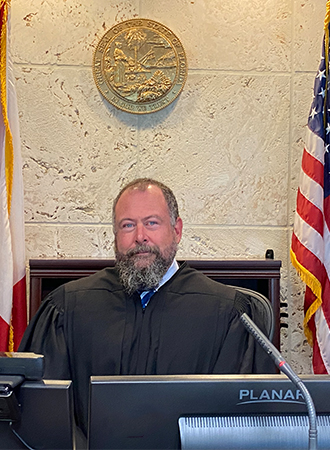
Judge Christopher Brown
Individual Rules, Standing Orders & Policies
- Rules last changed:
Limits & Logistics
Courtesy Copies
Exception To Recommended Order
Motion
Court-wideNotice Of Compliance
Court-wide- Immediately Upon Filing
Adjournments
Court-wideRequest must include
Communication
Chambers
Phone
Clerk
Phone
Court-wideClerk
Phone
Court-wideClerk
Phone
Court-wideDuty Judge
Document Format Requirements10 rules
On the first day of trial, each party must submit both a Microsoft Word electronic version and a typed copy of the proposed jury instructions and verdict forms.
On the first day of the trial, the attorney for each party shall submit to the Court both an electronic version in Microsoft Word and a typed copy of the proposed jury instructions and verdict form(s).
Oversized exhibits may be used at trial, but if practicable they must be reduced to 8 1/2 by 11 inches, with the reduced copy retained by the clerk.
Exhibits to be introduced which are larger than 8 1/2 x 11" may be used at trial, but if practicable, same shall be reduced to 8 1/2 x 11", and the reduced size copy shall be the exhibit retained by the Clerk in the court file.
Plaintiff exhibits must be pre-marked with numbers and defendant exhibits with letters.
All exhibits shall be pre-marked using numbers for Plaintiff’s Exhibits and Letters for Defendant’s Exhibits.
Composite exhibits must be satisfactorily marked or bound before presentation to the court.
To avoid the loss and disintegration of component parts of pages, all composite exhibits shall be satisfactorily marked and/or bound before presentation to the Court.
A party requesting written jury instructions must provide the court a clean copy without citations before the case is submitted to jurors.
Any party who intends to request that the Court provide a set of written jury instructions for the jury's consideration, pursuant to Rule 1.470(b), shall be responsible for providing a clean copy (i.e., without citations to authority) of the jury instructions and verdict form(s) to the Court for this purpose prior to the submission of the case to the jurors.
A certificate of service must not be included in the body of the proposed order.
Do not include a certificate of service in the body of the order.
A proposed order must omit the date while retaining the specified Collier County language.
Any reference to the date (Please keep the language “Done and Ordered in Collier County, Florida.”)
For a pro se party without an email address, the party’s name and address must appear at the bottom of the proposed order.
If there is a prose party that does not provide an email address, their name an address should be listed on the bottom of the order.
The proposed order must be stripped of the judge’s signature line and name.
Judge signature line and Judge’s name
Proposed orders and judgments must be submitted through the e-portal in Word format.
Please forward them through the e-portal in WORD format.
DOCX
Document Filing Requirements21 rules
The pretrial order must include a list of all photographs, documents, and exhibits.
Attached is a list of all photographs, documents and exhibits.
Document Type
Pretrial Order
Jury instructions and verdict forms must be submitted at the beginning of trial unless the court directs an earlier filing date.
Unless specifically directed by the Court to be filed at an earlier date, jury instructions and verdict forms shall be submitted at the beginning of the trial.
Document Type
Jury Instructions
A cover letter must accompany proposed orders and identify counsel’s review and any objection to the order’s form.
When submitting proposed orders for the Court’s consideration, a cover letter must be submitted. THE COVER LETTER MUST INDICATE THAT ALL COUNSEL HAVE REVIEWED THE PROPOSED SUBMISSION AND WHETHER OR NOT THEY HAVE AN OBJECTION TO THE FORM OF THE ORDER.
Document Type
Cover Letter
The motion must state that the nonmoving party completely failed to respond or object to discovery and failed to request an extension.
That there has been a complete failure to respond or object to discovery, and the non-moving party has failed to request an extension of time to respond to discovery; and
Document Type
Motion
The motion must state the nature of the discovery and the dates on which it was propounded and due.
The nature of the discovery and the date upon which the discovery was propounded and due;
Document Type
Motion
The Notice of Hearing must state the amount of time reserved for the hearing.
The amount of time reserved for the hearing.
Document Type
Notice Of Hearing
The Notice of Hearing must reflect that the moving party made a good-faith conference with the opposing party to resolve the motion’s issues.
The moving party must confer with the opposing party in a good faith effort to resolve the issues raised in the motion. Such conferral must be between the attorneys in- person, by phone or by video-conference.
Document Type
Notice Of Hearing
The Notice of Hearing must reflect compliance with the stated conferral and certification requirements.
Parties must comply with the conferral and certification requirements in Fla.R.Civ.P. 1.202 and 1.460(d).
Document Type
Notice Of Hearing
The Notice of Hearing must state whether the hearing is evidentiary.
If the hearing is to be evidentiary, this MUST be reflected in the Notice of Hearing.
Document Type
Notice Of Hearing
The motion must certify compliance with the discovery-conferral rule and state that the moving party conferred or attempted to confer.
That the moving party has otherwise complied with Fla.R.Civ.P.1.380(a)(2), certifying that he/she has conferred, or attempted to confer, with the person or party failing to make the discovery in an effort to secure the information or material without court action.
Document Type
Motion
The Notice of Hearing must identify each motion’s title, docket line number, and filing date.
The title of the motion or motions to be addressed at the hearing along with their docket line number AND the date that they were filed.
Document Type
Notice Of Hearing
Cross-noticed hearings may be canceled only with agreement from the self-represented parties or counsel, who must file a Notice of Cancellation of Cross-Notice of Hearing.
If a hearing has been cross-noticed by self- represented parties or counsel, then they must agree to the cancellation of the subject hearing and file a Notice of Cancellation of Cross-Notice of Hearing.
Document Type
Notice Of Cancellation Of Cross Notice Of Hearing
A Notice of Cancellation is required whenever a hearing is canceled.
If you cancel a hearing, you are required to file a Notice of Cancellation.
Document Type
Notice Of Cancellation
A cross-noticed motion hearing may not be canceled without the written consent of the parties or counsel.
You may not cancel a cross-noticed motion hearing without written consent of the parties/counsel.
Document Type
Notice Of Cancellation Of Cross Notice Of Hearing
An unstipulated motion to cancel a foreclosure sale must be filed using Form 1.996(b) and served on all parties.
If the Motion is not stipulated, a party seeking to cancel a foreclosure sale shall file and serve on all parties a Motion as contained in Form 1.996(b) of the Florida Rules of Civil Procedure.
Document Type
Motion
A case will not be removed from the trial docket until the Judge’s office receives the dismissal document and a Rule 1.998 Final Disposition Report.
The Judge will not take you off the trial docket until his office has received copies of the Notice or Stipulation of Dismissal and a Final Disposition Report in conformance with Rule 1.998 of the Rules of Civil Procedure.
Document Type
Final Disposition Report
Exhibits used in Zoom hearings must be marked with an exhibit number or letter and accompanied by an index.
All exhibits must be marked with an exhibit number or letter and you must provide an index.
Document Type
Exhibits
A Pre-Trial Conference Order must be submitted to the Court before the scheduled Pre-Trial Conference date.
A Pre-Trial Conference Order must be submitted to the Court prior to the Pre-Trial Conference Date.
Document Type
Pretrial Order
Proposed orders and judgments must be sent to the Judge’s Judicial Assistant after the court proceeding, not before it.
Please forward proposed orders and judgments to the Judge’s Judicial Assistant AFTER the court proceeding, NOT before it.
Document Type
Proposed Order
When a case is settled, the Judge’s office must be notified and a copy of the Notice or Stipulation of Dismissal forwarded.
If you settle your case, please notify the Judge’s office and forward a copy of the Notice or Stipulation of Dismissal.
Document Type
Notice Or Stipulation Of Dismissal
After processing the order, judicial software inserts the judge’s electronic signature, a date and time stamp, and the electronic certificate of service from the E-Filing Portal.
The judicial software will insert the judge's signature electronically with a date/time stamp included in the signature as well as the electronic certificate of service downloaded from the E-Filing Portal at the time the judicial software is processing the order.
Document Type
Proposed Order
Filing & Service rules
Electronic Filing Rules
A proposed order requiring judicial review must not be submitted until all supporting documents are viewable online.
Prior to sending proposed orders that will require Judge Stewart’s review, check the Clerk’s website to make sure that all required supporting documents are viewable online. DO NOT SEND THE PROPOSED ORDER UNTIL THE SUPPORTING DOCUMENT(S) ARE VIEWABLE ON THE CLERK’S SITE.
Page 1 | SUBMISSION OF PROPOSED ORDERS
Proposed orders should be submitted electronically through the E-Filing Portal.
Beginning March 1st, 2022, proposed orders can be submitted electronically via THE E-FILING PORTAL. This document contains instructions on submitting proposed orders electronically to Judge Stewart. All documents should be submitted through the E-Portal using these instructions.
Page 1 | SUBMISSION OF PROPOSED ORDERS
Proposed orders must be submitted through the E-Portal for review and signature; final judgments of foreclosure are the stated exception and must be mailed with copies and stamped envelopes for the parties.
All proposed orders MUST be submitted to the E-Portal for Judge Brown’s review and signature. Judge Brown’s office does NOT accept paper orders, with the exception of Final Judgments of Foreclosure which must be mailed to the Judge with copies and stamped envelopes for the parties.
Page 1 | GENERAL POLICIES AND PROCEDURES
All exhibits must be emailed to the Judge’s Judicial Assistant and supplied to the Clerk’s Office in paper form five days before the court proceeding, with exhibit markings and an index.
Please forward all exhibits to the Judge’s Judicial Assistant via email 5 days prior to your court proceeding. All exhibits must be marked with an exhibit number or letter and you must provide an index. You must also provide paper copies to the Clerk’s Office 5 days prior to the court proceeding.
Page 6 | EXHIBITS TO BE USED IN ZOOM HEARINGS
A filer may not send a proposed order to the court both by email and as a hard copy by mail or portal.
Do not email a proposed order to the Court and then send a hard copy through the mail or through the e-portal.
Page 1 | SUBMISSION OF PROPOSED ORDERS
Proposed orders should be submitted through the stated E-Filing Portal, and the assigned judge should be verified in the Clerk’s ShowCase System.
Proposed Orders should now be submitted via the e-filing portal at https://www.myflcourtaccess.com/default.aspx Please verify the assigned Judge by checking the Clerk’s ShowCase System.
Page 2 | SUBMISSION OF PROPOSED ORDERS
Filing Timing and Cure Windows
A proposed order must not be submitted before the case’s court date.
Do not send a proposed order prior to your court date.
Page 1 | SUBMISSION OF PROPOSED ORDERS
All motions must be set for hearing and heard within 60 days after filing, or they may be deemed abandoned and denied.
All motions must be set for hearing and heard within 60 days from filing the motion or the motion may be deemed abandoned and denied.
Page 2 | MOTIONS
After seven days from service, the moving party may submit an order if the nonmoving party neither provides the discovery nor requests an extension.
In the event that the non-moving party fails to provide the requested discovery, or fails to request an extension of time to respond to the discovery within seven (7) days of service of the Motion, the moving party may submit an Order to the Court.
Page 4 | SPECIFIC MOTION PROCEDURES — Motions to Compel Discovery
A hearing scheduled through JACS may be canceled until three business days before the hearing, but hearings set by the Court may not be canceled.
If you scheduled your motion through JACS, you may cancel up to 3 business days before the hearing. You cannot cancel hearings set by the Court.
Page 5 | CANCELLATIONS OF MOTION HEARINGS
The Clerk’s Office may take at least 48 hours to process any filed document.
NOTE: IT TAKES THE CLERK’S OFFICE AT LEAST 48 HOURS TO PROCESS ANY FILED DOCUMENTS.
Page 5 | CANCELLATIONS OF MOTION HEARINGS
A stipulated order to cancel a foreclosure sale must be submitted to Judge Brown at least 24 hours before the sale date, on a business day.
You may submit a Stipulated Order to Cancel Foreclosure Sale (at least 24 hours before the sale date – on a business day) to Judge Brown.
Page 5 | Motions to Cancel Foreclosure Sales
Service and Proof of Service Rules
All interested parties who will receive the signed order electronically must be added to the portal’s electronic service list.
You must add all interested parties to the electronic service list in the portal who will be served a copy after the Judge signs the order.
Page 1 | Form/Template Modifications
The moving party must serve the motion on the opposing party at least seven days before submitting the order to the court.
The moving party must serve the Motion on the opposing party at least seven (7) days prior to submission of the Order to the Court;
Page 4 | SPECIFIC MOTION PROCEDURES — Motions to Compel Discovery
The Notice of Cancellation must be filed with the Clerk’s Office and copies provided to all parties, counsel of record, and the Judge’s office.
The Notice of Cancellation should be filed with the Clerk’s Office, with copies being provided to all parties and counsel of record, as well as the Judge’s office.
Page 5 | CANCELLATIONS OF MOTION HEARINGS
The motion must be noticed for hearing and served on all parties at least five business days before the hearing.
The Motion shall be noticed for hearing, with service on all parties, at least five (5) business days BEFORE the hearing.
Page 5 | Motions to Cancel Foreclosure Sales
Copies of the exhibits forwarded to the Judge and Clerk’s Office must also be sent to opposing counsel and any self-represented parties.
You are required to forward to opposing counsel and any self-represented parties, copies of what is forwarded to the Judge and Clerk’s office.
Page 6 | EXHIBITS TO BE USED IN ZOOM HEARINGS
Opposing counsel must be copied by email on the proposed order and any cover letter submitted through the portal.
As with hard copy cover letters, copy opposing counsel with the Proposed Order and any cover letters submitted through the Portal.
Page 1 | Copy Opposing Counsel With the E-mail
Courtesy Copy Requirements
A copy must be provided to Judge Brown’s office when an exception to a magistrate’s recommended order is filed.
EXCEPTIONS TO THE MAGISTRATE’S RECOMMENDED ORDERS: If an Exception to the Magistrate's Recommended Order is filed, please provide a copy to Judge Brown’s office.
Page 3 | EXCEPTIONS TO THE MAGISTRATE’S RECOMMENDED ORDERS
Pre-Motion Conference Requirements
All motions must comply with Florida Rule of Civil Procedure 1.202’s conferral requirement before filing.
PLEASE MAKE SURE ALL MOTIONS FILED COMPLY WITH FLORIDA RULE OF CIVIL PROCEDURE 1.202 – “CONFERRAL PRIOR TO FILING MOTIONS”.
Page 2 | MOTIONS
A civil motion to compel may be submitted without a hearing only if the moving party follows the procedures stated in the order.
A Motion to Compel discovery in a civil action may be submitted to the Court without a hearing if the moving party has complied with the following procedures:
Page 4 | SPECIFIC MOTION PROCEDURES — Motions to Compel Discovery
Chambers Communication Rules
For hearings longer than 30 minutes and up to one hour, parties must email the Judicial Assistant and all parties rather than send a letter to the judge.
For all hearings longer than 30 minutes, please contact Judge Brown’s Judicial Assistant to schedule. You do NOT need to send a letter to the Judge for a hearing of up to 1 hour, just email the Judicial Assistant and all parties, and she will provide you with the Court’s availability.
Page 3 | SCHEDULING HEARINGS
A request for a hearing longer than one hour must be submitted by email with the underlying motion attached.
For hearings longer than one (1) hour, please submit your request in a email and attach the Motion upon which you are requesting a hearing.
Page 3 | SCHEDULING HEARINGS
Motions requiring 30 minutes or less are scheduled through JACS, while longer hearings are scheduled by emailing the Judicial Assistant and copying all parties.
JUDGE’S MOTION CALENDAR: Judge Brown schedules Motions requiring 30 minutes or less via the JACS scheduling system. Longer hearings may be scheduled by sending an email to the Judicial Assistant, including all parties on said email. (mpelle@ca.cjis20.org )
Page 3 | SCHEDULING HEARINGS — JUDGE’S MOTION CALENDAR
The Judicial Assistant will not schedule a motion until an email identifies a date and time accepted by all parties or their attorneys, after which she will provide a confirmation number.
Judge Brown’s Judicial Assistant does not actually schedule your motion until you email her as to which date and time is acceptable to all parties or their attorneys. She will then give you a confirmation number. We do not hold dates, so act quickly to confirm the date you have agreed on.
Page 3 | SCHEDULING HEARINGS
A party unable to log in to JACS must email its bar number to CollierJacs@ca.cjis20.org.
If you are unable to successfully log-in, send an email with your bar number to CollierJacs@ca.cjis20.org.
Page 3 | SCHEDULING HEARINGS — JACS Log-On Information
Parties having scheduling difficulty must contact Judge Brown’s Judicial Assistant by email.
Contact Judge Brown’s Judicial Assistant via email if you are having difficulty scheduling.
Page 4 | SCHEDULING HEARINGS — NO BACK-TO-BACK SCHEDULING
Micheal Lake may be contacted by telephone at (239) 533-1727 with questions about e-filing.
For E-filing related questions, please contact Micheal Lake at (239) 533-1727
Page 1 | SUBMISSION OF PROPOSED ORDERS
Judge Brown’s office may be contacted by email at mpelle@ca.cjis20.org.
You may contact Judge Brown’s Office via email at mpelle@ca.cjis20.org (Judicial Assistant: Melissa Pelle).
Page 1 | GENERAL POLICIES AND PROCEDURES
To ensure that a motion is received by Judge Brown, a copy may be emailed to the judge’s Judicial Assistant.
However, if you want to ensure that the motion is received by Judge Brown, please email a copy to his Judicial Assistant.
Page 5 | Motions for Rehearing/ New Trial/Advance Docket